



Brand: Generic ( Made in India )
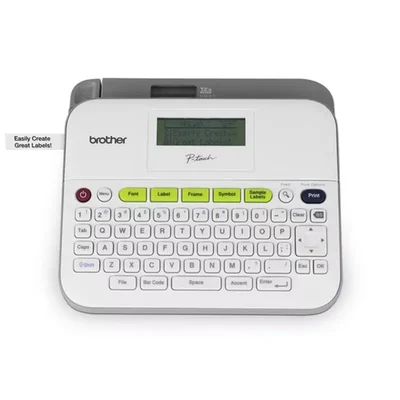
Brother 18mm TZe Tape QWERTY Desktop Barcode Graphic Screen Label Maker Printer Machine PT-D400
SKU: TB-CO-77940 Estimated Delivery By: Oct 29 - Oct 31





MRP : ₹18866 ₹13476
29% OFF!
Estimated Delivery By: Oct 29 - Oct 31 Easy Return
& Refund
& Refund
Quality
Assurance
Assurance
Trusted
Delivery
Delivery
After Sales
Assistance
Assistance
Buyer
Protection
Protection
₹13476 (Including GST)
MRP : ₹18866
29% OFF!
Get Extra ₹202 OFF on Prepaid Orders
QTY :
-
1
+
Short Description
A professional standalone desktop label printer with a large graphic display, barcode support, and a built-in template collection.
Country of origin: India
Specifications
- Brand: Generic ( Made in India )
- Device Configuration: Non-PC Connected Desktop Standalone
- Display Resolution Panel: 16 Characters x 3-Line (or 2-Line) Graphic LCD Interface
- Supported Media Layouts: TZe Laminated Heavy-Duty Tapes
- Supported Width Configurations: 6mm, 9mm, 12mm, and 18mm tape sizes
- Data Layout Features: Specialized Barcoding & Onboard Label Collection Templates
- Typography Customization: 14 Fonts / 10 Styles / 99 Frames / 600+ Symbols
- Internal Save Memory: Storage capacity for up to 50 user-designed label templates
- Cutting Component: Integrated Manual Push Lever Cutter System
- Power Input System: 6 x AA Alkaline Batteries (Optional) or AC Power Adapter (Optional)
Description
The Brother PT-D400 is an advanced, standalone desktop label engineering system designed to simplify organizational tasks across offices, retail spaces, and heavy-duty workshops. Featuring an ergonomically spaced, easy-to-type QWERTY keyboard and an expanded high-clarity graphic LCD display with print preview, this machine allows users to perfectly adjust, frame, and verify configurations prior to printing. It seamlessly supports durable, laminated TZe series tapes up to 18mm wide, ensuring all output resists harsh water exposure, heavy abrasion, and UV fading. Armed with onboard barcode creation, a comprehensive pre-designed label collection, and a 50-file design memory storage capacity, it is a comprehensive tool for asset tracking, cable marking, and inventory management without requiring any PC connection.
Features
:- Large Graphic Preview Screen: Offers a crisp 16-character screen layout with full print preview capability to catch errors before printing.
- Built-in Barcode Engine: Supports independent, standalone printing of barcodes for reliable product tracking and retail asset management.
- Durable Laminated Printing: Produces high-grade labels utilizing TZe tapes (up to 18mm wide) that survive extreme weather, friction, and moisture.
- Deep Styling Library: Loaded with 14 foundational fonts, 10 diverse text styles, 99 decorative frames, and more than 600 specialized symbols.
- Label Collection Memory: Keeps a local database storing up to 50 custom label designs for instant access and quick high-volume reprints.
- Dual Power Configuration: Operates anywhere via 6 standard AA batteries or through an alternative optional AC wall adapter.
Applications
:- Commercial Asset Tracking: Printing precise barcode stickers for scanning office machinery, hard drives, and physical inventory.
- Electrical & Workshop Tagging: Marking industrial power cables, safety switches, machinery panels, and storage bins.
- Complex Office Filing: Categorizing extensive files, archive boxes, property binders, and visual corporate display tags.
- Retail Supply Operations: Structuring clear price tag strips, storage rack numbers, expiration date codes, and delivery markings.
Usage
:- Pop open the rear hatch compartment door to firmly place a 6mm to 18mm TZe tape cartridge inside the structural guiding grooves.
- Insert 6 fresh AA standard batteries into the base chamber slot or attach the specialized AC external adapter to activate the machine.
- Key in your text tags directly using the ergonomically spaced built-in QWERTY typewriter keyboard.
- Apply advanced settings by navigating to the barcode option or browse the custom pre-made Label Collection files.
- Review your overall spelling, margin spaces, and border formats using the crisp, multi-line graphic preview LCD panel.
- Press the prominent print key button, then depress the external manual cutting lever down to isolate your finished laminated label.
Ask AI

 AI-generated answers may be inaccurate. Double-check critical facts.
 Questions & Answers (0)

Select attribute