


Brand: Universal Seal
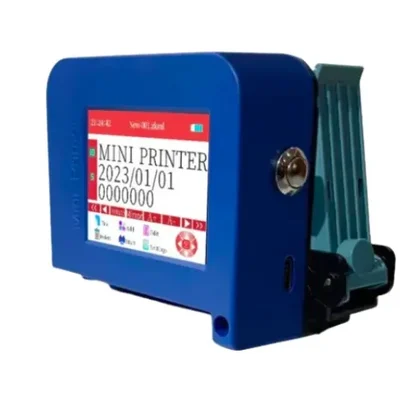
Mini Portable Logo and Barcode Printer with Water Based Cartridge
SKU: SI-MP-18678
 6 people have bought this recently
  Estimated Delivery By: Oct 10 - Oct 12





MRP : ₹8199
6 people have bought this recently Estimated Delivery By: Oct 10 - Oct 12 Easy Return
& Refund
& Refund
Quality
Assurance
Assurance
Trusted
Delivery
Delivery
After Sales
Assistance
Assistance
Buyer
Protection
Protection
₹8199 (Including GST)
Get Extra ₹123 OFF on Prepaid Orders
QTY :
-
1
+
Short Description
Mini Portable Logo and Barcode Printer with Water Based Cartridge
25 Watt Power Rating
12.7 mm Cartridge Type
Country of origin: China
Specifications
- Brand: Universal Seal
- Weight (Approx.) : 0.7 kg
- Body Material : Plastic
- Printing Type : Logo & Barcode
- Cartridge : Included
- Cartridge Type : Water Based
- Max Printing Size : 12.7mm
- Power input : DC-9V/2A
- Power Rating : 25 Watt
- Cartridge type : 12.7 mm
- Power supply mode : Fast charge 3.0 adapter
- Print resolution : 600 dpi (Maximum)
- Printing distance : 2-5mm
- Dimensions (L x W x H) : 97 x 70 x 45 mm
- Weight : 0.7 kg (Approx.)
NOTE :
- Calibration required for the first time using the machine.
- Ink darkness will be 60% to 75%
- If you want colour printing then you need to use colouring cartridges which are available on our site.
Description
This Mini Portable Logo and Barcode Printer is a compact, handheld printing device designed for on-the-go printing of logos, barcodes, and other variable data. This printer utilize inkjet technology to produce high-quality prints on various surfaces, including paper, plastic, and metal. It is lightweight and battery-operated, allowing users to print labels or branding materials anywhere without the need for a stationary setup.
Features
:- Compact and Lightweight Design : Mini portable printers are designed to be easily carried.
- Versatile Printing Capabilities : They can print various content types including logos, barcodes & QR codes directly onto different surfaces such as paper, plastic, wood, and metal.
- Battery Powered : This printer is battery-operated, providing the convenience of printing on the go without needing a power outlet.
- Quick Setup and Operation : Mini inkjet printers are generally easy to set up and operate, allowing for rapid deployment in production environments.
Accessories
:- 1 Styler/Pen
- 1 Charger
Applications
:- Retail : These printers can produce price tags, product labels, and promotional stickers on-the-go, enhancing the efficiency of inventory management and customer service.
- Logistics and Shipping : They are used to print shipping labels and barcodes directly at the point of packing, streamlining the logistics process and improving tracking accuracy.
- Healthcare : In medical settings, these printers can create patient wristbands, medication labels, and other essential identification tags that require quick printing in various locations.
- Event Management : They facilitate the printing of tickets, badges, or wristbands for events, allowing for immediate issuance at entry points.
Usage
:- Check the Printer : Before using the mini barcode printing machine, ensure it is clean.
- Edit the Bar Code : Once you confirm that the printer is functioning properly, edit your desired barcode in the software.
- Position for Printing : Move the nozzle to the specific location where you want to print the barcode on your product.
- Print the Barcode : Press the printing button to spray the code onto your product.
- Post Printing Process : After printing, remove the ink cartridge from the printer and store it in its protective cover to prevent drying out of the nozzle.
Maintenance :
- To get an uninterrupted flow of the ink from the cartridge, we recommend to keep this cartridge at a normal temperature and do not let it be opened for more than 10 mins as it may lead to getting dry. Also clean the other of the cartridge with a tissue to get a decent print.
- Regularly inspect print outputs for clarity and consistency. If prints are blurred or incomplete, it may indicate the need for cleaning or adjustment.
- For inkjet machines, use a specialized cleaning solution to keep nozzles clear and functioning properly.
Ask AI

 AI-generated answers may be inaccurate. Double-check critical facts.
 Questions & Answers (0)

Select attribute