
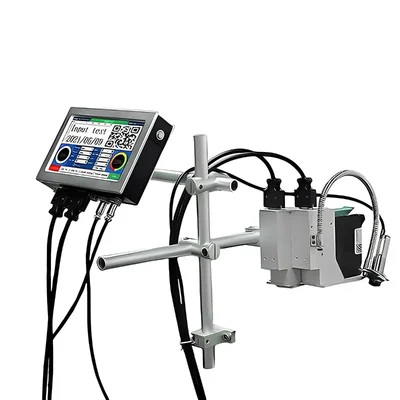






Brand: Generic (Imported)
Online Thermal Inkjet Printer 50 mm with Stand
SKU: SD-AG-20231750
 2659 people have viewed this recently
  Estimated Delivery By: Oct 9 - Oct 11




MRP : ₹51999
2659 people have viewed this recently Estimated Delivery By: Oct 9 - Oct 11 Easy Return
& Refund
& Refund
Quality
Assurance
Assurance
Trusted
Delivery
Delivery
After Sales
Assistance
Assistance
Buyer
Protection
Protection
₹51999 (Including GST)
Get Extra ₹780 OFF on Prepaid Orders
QTY :
-
1
+
Short Description
Online Thermal Inkjet Printer 50 mm
8 GB internal storage
USB type connector
Country of origin: China
Specifications
- Brand: Generic (Imported)
- Weight (Approx.) : 5 kg
- Body Material : Metal Body
- Printing Technology : Solvent based dispensing
- Connector Type : USB
- Internal Storage : 8 GB
- Processor type : Quad core processor
- Printer Output : Monochrome
- Resolution : 600 DPI
- Maximum Print Speed (Color) : 6-10 Pages per second approx
- Max Print speed Monochrome : 6 Pages per second
- Uses for Product : Can be used in Office/personal/commercial etc.
- Weight : 5 kg (approx.)
Note :
- Cartlidge and Conveyor not included.
- Calibration required for the first time using the machine.
Description
This Online Thermal Inkjet Printer is a type of printer that utilizes thermal inkjet technology to produce high-resolution prints. This technology involves heating ink to create vapor bubbles that propel the ink onto a substrate, resulting in sharp and clear images or text. This printer can operate in simultaneously with production lines or other equipment, allowing for real-time printing of variable data, such as barcodes, expiration dates, and batch numbers.
Features
:- Printing Width : The "50 mm" in its name indicates that this printer can print on a surface that is 50 millimeters wide. This size is suitable for various applications, making it adaptable to different product dimensions and packaging types.
- Stand : The inclusion of a stand enhances the printer's usability and ergonomics. A dedicated stand provides stability and allows for easy integration into existing production lines, ensuring that it remains at an optimal height and position for operators.
- High Resolution : Online Thermal Inkjet Printers are known for their high print quality. They can achieve resolutions of up to 600 dpi, resulting in crisp, legible prints that meet industry standards.
- User -Friendly Interface : This Online Thermal Inkjet Printer come with intuitive controls and touchscreen interfaces, simplifying operation and allowing for easy adjustments to settings.
Applications
:- Manufacturing : It is widely used for marking and coding products directly on production lines. Items can be printed with essential information such as serial numbers, barcodes, and product specifications in real time.
- Packaging : The printer can be utilized for printing on packaging materials, ensuring that important details like expiration dates and nutritional information are easily readable.
- Pharmaceuticals : The stringent regulations in this industry require clear labeling of products. This printer’s high-resolution output ensures compliance with these regulations while enhancing product traceability.
- Food and Beverage : In the food industry, accurate dating and labeling are crucial for safety and quality assurance. The Online Thermal Inkjet Printer facilitates the reliable printing of vital information on food packaging.
Usage
:- Setup the Printer : Unbox the printer and ensure all components, including the stands, are present. Place the printer on a stable surface using the included stands to ensure proper height and stability.
- Installation of the Cartridge : Open the cartridge compartment of the printer. Insert the cartridge (not included) into the designated slot, ensuring it clicks into place securely.
- Connect Power : Plug in the power cord to an electrical outlet and connect it to the printer.
- Load Media : Load your printing media (paper, fabric, etc.) into the printer according to specifications.
- Start Printing : Once satisfied proceed with bulk printing as needed.
Maintenance :
- Regular Cleaning : Clean the print head regularly to prevent clogging and ensure consistent print quality.
- Inspect Connections : Periodically check all electrical and data connections to ensure they are secure and free from damage.
Ask AI

 AI-generated answers may be inaccurate. Double-check critical facts.
 Questions & Answers (0)

Select attribute