


<
>


Brand: Universal Seal
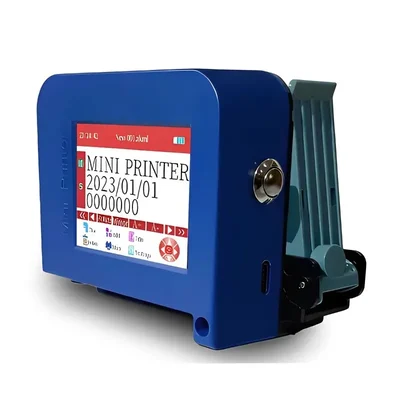
Mini Portable Logo and Barcode Printer without Cartridge (Pendrive Included)
SKU: SI-MI-18677
 12 people have bought this recently
  Estimated Delivery By: Oct 10 - Oct 12





MRP : ₹7934 ₹6399
19% OFF!
12 people have bought this recently Estimated Delivery By: Oct 10 - Oct 12 Easy Return
& Refund
& Refund
Quality
Assurance
Assurance
Trusted
Delivery
Delivery
After Sales
Assistance
Assistance
Buyer
Protection
Protection
₹6399 (Including GST)
MRP : ₹7934
19% OFF!
Get Extra ₹96 OFF on Prepaid Orders
QTY :
-
1
+
Short Description
Mini Inkjet Batch Coding Machine, Date Printing Machine
12.7mm Cartidge Type
25 Watt Power Rating
Country of origin: China
Specifications
- Brand: Universal Seal
- Weight (Approx.) : 120 gm
- Body Material : Plastic Body
- Printing Type : Logo & Barcode.
- Cartridge : Not Included
- Max Printing Size : 12.7mm,
- Power input : 9V/2A
- Power Rating : 25 Watt
- Power supply mode : Fast charge 3.0 adapter
- Print resolution : 600 dpi (Maximum)
- Printing distance : 2-5mm
- Cartridge : Not Included
- Weight : 120 gm (approx.)
NOTE :
- Calibration required for the first time using the machine.
- If you want colour printing then you need to use colouring cartridges which are available on our site.
Description
This Mini Portable Logo and Barcode Printer is a compact, lightweight printing device designed for on-the-go use, capable of producing high-quality logos and barcodes. These printers typically utilize inkjet technology to print directly onto various surfaces, including packaging materials, labels, and products. They are characterized by their portability, allowing users to easily carry them for immediate printing needs in diverse environments such as retail, logistics, manufacturing, and events.
Features
:- Wireless Connectivity : Compact inkjet batch coders frequently have wireless connectivity built in, making it simple to integrate them with other systems and devices.
- Small Size : These printers' portability and compact design make them perfect for printing on a range of materials and goods.
- High Resolution Printing : Barcodes, logos, text, and other information can all be printed with clarity and precision using mini inkjet batch coding machines, which usually have high resolution printing capabilities.
- Numerous Line Printing : This feature enables the printing of numerous lines of text, which makes it possible to include comprehensive data like dates, batch and serial numbers, and more.
Accessories
:- 1 Styler/Pen
- 1 Charger
- 1 Pendrive
Applications
:- Food and Beverage Industry : These machines are used to print essential information such as expiration dates, batch numbers, and production dates directly onto packaging materials.
- Pharmaceuticals : In the pharmaceutical sector, mini inkjet printers are crucial for printing vital information on medication packaging, including dosage instructions, manufacturing dates, and unique identifiers that aid in tracking and authenticity verification.
- Cosmetics and Personal Care : These machines are employed to print labels on cosmetic products, providing consumers with important details like ingredients, usage instructions, and expiration dates.
- Logistics and Shipping : They are also utilized in logistics for printing shipping labels that contain tracking information, ensuring efficient handling and delivery of packages.
Usage
:- Check the Printer : Before using the mini barcode printing machine, ensure it is clean.
- Edit the Bar Code : Once you confirm that the printer is functioning properly, edit your desired barcode in the software.
- Position for Printing : Move the nozzle to the specific location where you want to print the barcode on your product.
- Print the Barcode : Press the printing button to spray the code onto your product.
- Post Printing Process : After printing, remove the ink cartridge from the printer and store it in its protective cover to prevent drying out of the nozzle.
Maintenance :
- Nozzle Cleaning : For inkjet machines, use a specialized cleaning solution to keep nozzles clear and functioning properly.
- Check Print Quality : Regularly inspect print outputs for clarity and consistency. If prints are blurred or incomplete, it may indicate the need for cleaning or adjustment.
Ask AI

 AI-generated answers may be inaccurate. Double-check critical facts.
 Questions & Answers (0)

Select attribute