


Brand: Generic ( Made in India )
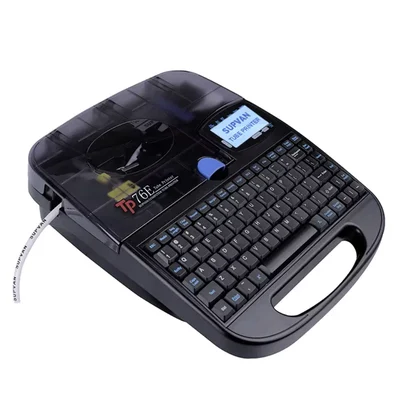
Supvan 12mm PC Connected Multi-Material Industrial Electronic Cable ID Tube Label Printer TP76E
SKU: TB-CO-77971 Estimated Delivery By: Oct 28 - Oct 30




MRP : ₹55172 ₹42440
23% OFF!
Estimated Delivery By: Oct 28 - Oct 30 Easy Return
& Refund
& Refund
Quality
Assurance
Assurance
Trusted
Delivery
Delivery
After Sales
Assistance
Assistance
Buyer
Protection
Protection
₹42440 (Including GST)
MRP : ₹55172
23% OFF!
Get Extra ₹637 OFF on Prepaid Orders
QTY :
-
1
+
Short Description
High-performance, PC-connectable industrial cable ID printer designed for batch printing on ferrule tubes, labels, and heat-shrink sleeves.
Country of origin: India
Specifications
- Brand: Generic ( Made in India )
- Interface Connectivity: High-Speed PC Connect Layout Sync
- Keyboard Matrix Layout: 78-Key Ergonomic Standard Keyboard Array
- Visual Monitor Display: Large White Back-Lit LCD Panel (Supports 2 Lines)
- Supported Tube Diameters: 2.5 mm to 6.0 mm (PVC Ferrule & Heat Shrink Tubes)
- Supported Tape Width Sizes: 6 mm, 9 mm, and 12 mm Adhesive Media Roll Spools
- Plate Printing Capacity: 4 mm Structural Rigid Marking Plates
- Automated Mechanical Functions: Auto Feed, Auto Clean, Ribbon Pre-Tighten, Half-Cut, Full-Cut
- Internal Storage Matrix: High Capacity (Holds up to 64 individual files)
- Operating Language Core: Multilingual System Interface with 16 System Languages
Description
The Supvan TP76E is a versatile, heavy-duty industrial electronic cable ID printer engineered for demanding engineering environments. Featuring full PC connectivity, this robust system allows users to seamlessly import Excel sheets for high-speed, high-volume batch print workflows. Equipped with a 78-key standard keyboard and a large white back-lit LCD screen supporting 2-line textual layouts, it facilitates rapid manual data entry. The unit processes diverse tracking media, including PVC tubes and heat-shrink sleeves from 2.5mm to 6.0mm in diameter, adhesive label tapes across 6mm, 9mm, and 12mm widths, and structural 4mm plates. With a built-in automated mechanism that handles tape feeding, cleaning, ribbon pre-tightening, and half/full cutting sequences, this low-maintenance device streamlines wire marking across switchboards and networks.
Features
:- PC & Excel Batch Integration: Connects directly to external computers to import massive data lists from Excel spreadsheets for swift, automated batch labeling.
- Multi-Material Printing Engine: Universally handles specialized industrial media including raw PVC tubes, heat-shrink sleeves, adhesive tapes, and 4mm rigid plates.
- Fully Automated Handling: Advanced mechanical subsystem drives automated media feeding, internal cleaning, ribbon pre-tightening, and precision half-cut/full-cut cycles.
- Heavy Workgroup Efficiency: Built-in copy, repeat, and continuous sequential numbering parameters paired with an expansive 64-file internal memory storage array.
Applications
:- Industrial electrical panel workshop switchboard construction and termination terminal wire mapping.
- Telecommunications structural data center network setup, patching layout tracing, and fiber optic cable harness grouping.
- Commercial electronics control cabinet manufacturing, circuit board indexing, and power distribution box labeling.
- Heavy industrial manufacturing facility maintenance, plant structural asset identification logs, and engineering retrofitting updates.
Usage
:- Set the heavy-duty industrial printer machine onto a secure, dry workspace bench near your desktop computer configuration.
- Connect the dedicated external power adapter line into the rear port, plug it into an outlet, and bridge the PC interface link cable to your computer system.
- Open the main media cover hatch frame to mount the appropriate thermal transfer ink ribbon cartridge roll down firmly into the alignment tracks.
- Load your choice of media stock—such as feeding loose PVC ferrule tubing through the outer guide slot or dropping in a 12mm adhesive label tape cassette.
- Switch on the hardware to boot the multilingual software engine, choosing your preferred operational setup language via the 16-language interface menu.
- Type your desired line formatting entries manually via the 78-key standard dashboard button array, tracking character text variables on the back-lit screen panel.
Ask AI

 AI-generated answers may be inaccurate. Double-check critical facts.
 Questions & Answers (0)

Select attribute