





Brand: Generic (Imported)
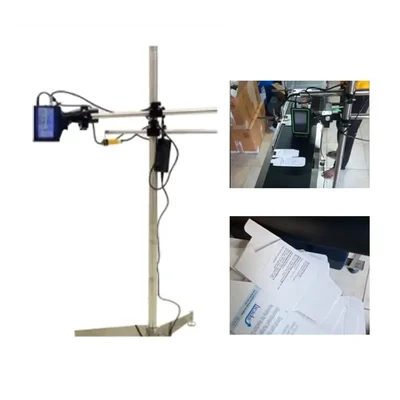
123 cm Height Adjustable TIJ Printer Stand for Automatic Inkjet Batch Coding Machine
SKU: JS-AP-20211667
 36 people have bought this recently
  Estimated Delivery By: Oct 8 - Oct 10





MRP : ₹6599 ₹6399
3% OFF!
36 people have bought this recently Estimated Delivery By: Oct 8 - Oct 10 Easy Return
& Refund
& Refund
Quality
Assurance
Assurance
Trusted
Delivery
Delivery
After Sales
Assistance
Assistance
Buyer
Protection
Protection
₹6399 (Including GST)
MRP : ₹6599
3% OFF!
Get Extra ₹96 OFF on Prepaid Orders
QTY :
-
1
+
Short Description
Stand for Automatic Inkjet Batch Coding Machine
Heavy Duty Model
Country of origin: China
Specifications
- Brand: Generic (Imported)
- Weight (Approx.) : 5.8 kg
Note : Video is for reference purpose only.
Toolsvilla deals in various types of Packaging Machinery. A wide variety of Batch Coding Machines can be used to print notes such as Batch Number, Date, Expiry Date, and MRP on plastic bags, in the food and pharmaceutical industries.
Description
This is a 123cm tall, height-adjustable printer stand specifically designed for automatic Thermal Inkjet (TIJ) batch coding machines. It features a sturdy metal body for durability and includes anti-slipping technology to ensure stable operation. The stand operates at a frequency of 50 Hz and weighs approximately 5.8 kg.
Features
:- Height Adjustable: The stand's height can be adjusted to accommodate different printing needs and setups.
- Durable Metal Body: Constructed from metal, ensuring robustness and stability.
- Anti-Slipping Technology: Incorporates features to prevent the printer stand from sliding or moving during operation.
Applications
:This is a sturdy and adjustable metal stand (123 cm maximum height) designed to securely hold automatic Thermal Inkjet (TIJ) batch coding machines. It features anti-slip technology for stability and is suitable for various industrial printing applications.
Usage
:Maintenance:
- Regular Cleaning: Wipe down the metal body of the stand with a clean, dry cloth to remove dust and debris. For more stubborn stains, a slightly damp cloth with mild soap can be used, followed by drying.
- Check for Looseness: Periodically inspect all screws, bolts, and adjustment mechanisms to ensure they are tight and secure. Tighten any loose connections.
- Inspect Anti-Slipping Features: Check the anti-slip components (e.g., rubber feet) for wear and tear. Replace them if they are damaged or no longer effective.
- Lubrication (if applicable): If the height adjustment mechanism has moving parts that require lubrication, apply a suitable lubricant as recommended by the manufacturer.
- Storage: When not in use, store the printer stand in a clean and dry environment to prevent corrosion or damage.
Precautionary Guidance:
Ask AI

 AI-generated answers may be inaccurate. Double-check critical facts.
 Questions & Answers (0)

Select attribute